What to Expect During a Home Network Assessment
How a Wi-Fi Assessment Finds Your Home's Weak Spots
Your Wi-Fi works fine in the room with the router, but it falls apart two rooms away—what’s your next step? Many homeowners respond by restarting the router or buying a newer one, but the issue seems to return right away. High-speed Wi-Fi that holds up in every room starts with finding out where and why the signal drops in the first place.
A network assessment answers that question. Keep reading to learn what a network assessment visit from Elite Technology Solutions involves, including how heat mapping works and what Elite can do to overcome signal-blocking materials.
MORE FOR YOUR HOME: We're Your Local Home Automation Company in St. Louis
What Happens During a Network Assessment Visit?
- It starts with a conversation. Elite’s networking specialists will ask which rooms give you the most trouble and explore how your household uses the network. Your insights can provide valuable information about where and when problems show up.
- Your current equipment gets a look. The technician checks the modem and router you already have, as well as the cabling, and takes stock of the devices competing for the signal. That shows whether the problem is the equipment, the walls, or both.
- Then comes the room-by-room walk-through. Using your floor plan, the technician marks where the equipment sits and what stands between it and the rest of the house, such as thick walls, multiple floors, electronics, or a layout that stretches the signal thin. This is how Elite finds out not only why the signal drops but also where.
- Priority rooms get marked. A home office and a media room have different needs than a guest bedroom, so the technician notes where you need the most dependable coverage. Those notes guide Elite's recommendations, so the plan puts coverage where you use it most.
Heat Mapping Shows Where Your Signal Goes
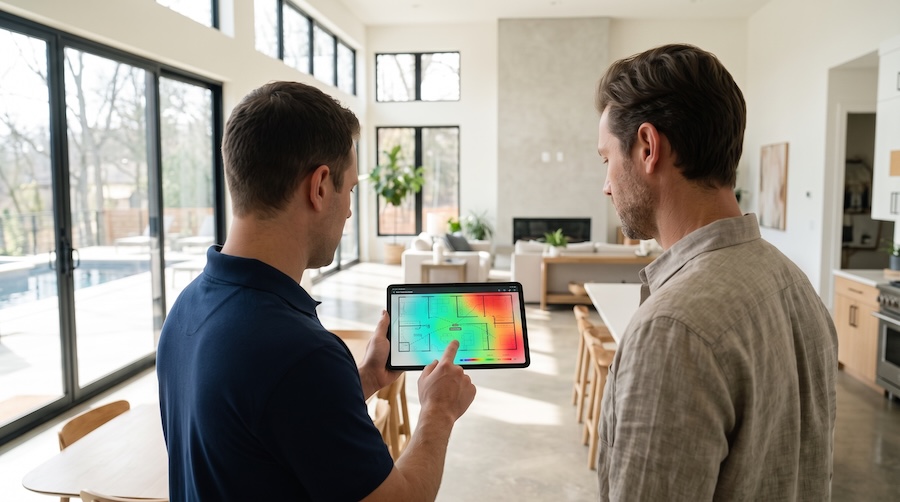
A heat map is a color-coded floor plan that shows Wi-Fi strength room by room. Strong signal shows up in green and weak or missing signal in red, so a dead zone that felt like a mystery becomes something you can see with your own eyes.
To build one, Elite’s networking technician walks through the home with a survey tool, taking readings along the way. The readings capture signal strength and speed, as well as interference from nearby networks and appliances. The map also shows where neighboring networks crowd the same channels, which is a common cause of slowdowns that signal strength alone cannot explain.
For a new build or a major remodel, the map can be created from the plans before any walls go up, using the planned materials to predict how far the signal will travel. After installation, the survey is repeated to confirm that every room performs the way the first map predicted.
Building Materials Can Block Wi-Fi Performance
Standard drywall barely slows a Wi-Fi signal, but many homes across the St. Louis area are built differently. Brick is common, and older homes in neighborhoods such as Webster Groves and Clayton often add stone or plaster walls, sometimes over metal lath. Foil-backed insulation, low-emissions window glass, metal ductwork, and large mirrors can block a signal, too. Each one absorbs or reflects part of the signal, and several in a row can stop it completely.
The faster bands are the most affected. The 5 GHz and 6 GHz bands carry more data than the older 2.4 GHz band, but they lose signal strength faster when passing through walls. That is why a connection can be fast near the router and unusable in the next room.
Working Around Dense Materials & Interference
The fix is rarely a stronger signal from one central spot. Elite places access points so each covers a smaller area with fewer walls in the way, usually mounted on ceilings in the rooms that need coverage. A room behind a brick wall gets its own access point inside the space, so the signal never has to pass through the masonry.
Each access point connects back to the network with a cable, so the wall blocking the signal doesn't slow the connection behind it. The technician also plans cabling routes through attics and wall chases, so everything is ready on installation day.
Wireless mesh nodes can fill in a spot or two with limited coverage in some homes. In houses with dense construction, a wired connection to each access point holds up better, and the walk-through and cabling check show which approach fits yours.
What the Assessment Produces
You get a written plan that shows where each access point goes and how the cabling will reach it. The plan also covers the systems that rely on the network, including your Crestron control system, whole-home audio, and streaming, so none of them compete for bandwidth with other network traffic.
Let's Make the Connection
If certain rooms never get the Wi-Fi you pay for, an assessment is the best way to find out why. Elite has designed audio, video, lighting, and automation systems since 1988, and the team is ready to help you as well. Request a free, no-obligation network assessment for your home today.
